 Agentic Collaboration Environment
Organise your
agent teams.
Boost the productivity of your Claude Code agents: run them side by side, see who needs you, and hand out work on a shared board.
- Free and open source
- Runs on your machine
- Ready in a minute
Ziggy One
Agentic Collaboration Environment
5 agents · 1 workspace
or open an agent from the list
To do
- #15Refunds module
- #14Getting-started guide
In progress
- #12Split the orders service
- #13Checkout integration tests
Done
- #11Product page polish
One agent is an assistant. Several agents are a team.
A team needs a place to work together. Ziggy One gives your agents one.
See the whole team
Every agent on one page with its live status. Know at once who is working, who is idle and who is waiting for you.
Hand out the work
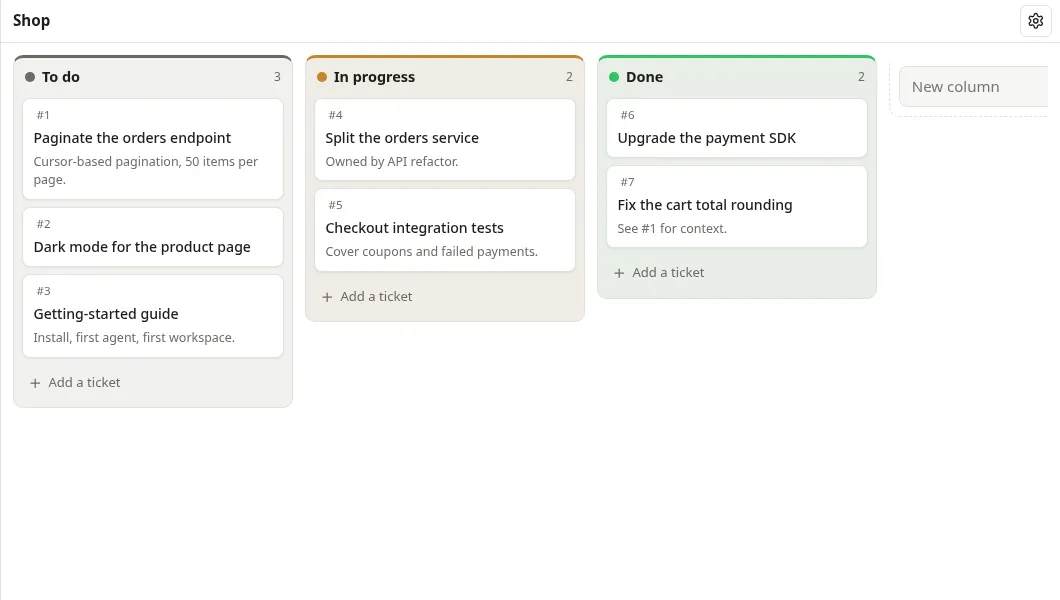
A shared Kanban board your agents use themselves: they take a ticket, update it and move it to Done.
Agents that work together
Give each agent a role. Every agent knows who else is on the team and how to reach them, and sees what teammates did in the same repository.
Shaped to your workflow
Ask an agent to change Ziggy One itself, restart from the interface, and use your change.
See how
Built for daily work with agents
Everything in one tab, served by your own machine.
Real Claude Code
Each agent is the real
claudein a terminal: slash commands, permissions, everything. Closing the tab does not stop it.Workspaces
Group agents by project or client, pin, rename and resume them. Desktop notifications when one needs you.
Readable conversations
Each session rendered as clean Markdown, with folded tool calls. Copy it or export it to PDF.
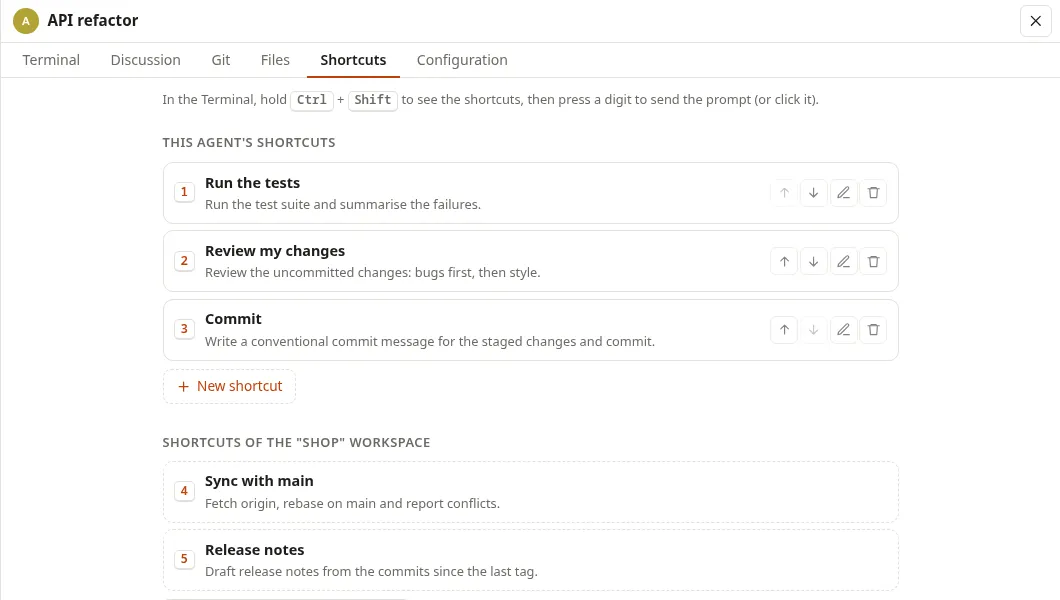
Prompt shortcuts
Save the prompts you type every day and send them with Ctrl+Shift and a number.
Files and Git
Browse and edit an agent's folder, commit, branch and push without leaving the page.
Usage at a glance
Your plan's 5-hour and weekly usage, and how full each agent's context is.
A board your agents actually use
Tell an agent "take #4 and move it to Done when the tests pass". It does, through a local MCP server.
One keystroke, one prompt
Your daily prompts, per agent or per workspace, one shortcut away.
Ctrl + Shift + 1…0
A tool your agents can rebuild for you
Plain Python, HTML, CSS and JS, with no build step. Want a new panel or a different workflow? Ask an agent running inside Ziggy One.
- 1
Ask
“Add a filter for agents waiting for me.”
- 2
Restart in one click
Working agents pause, every terminal reopens and agents resume.
- 3
Use it
The page reloads with your change.
Your machine, your account, your data
No cloud, no account, nothing to trust but a few readable files.
Local only
Served on 127.0.0.1, never on the network. Sign-in links are single-use and expire after 5 minutes.
Your Claude account
Ziggy One uses your existing Claude Code login and never sees your credentials.
Data stays home
Everything lives in ~/.local/share/ziggy-one, readable by you only.
Strict web security
Strict Content Security Policy, no CDN, CSRF protection.
Secrets kept from file tools
Agents' file tools cannot read Ziggy One's token or keys (a shell command you approve still runs as you). The Files tab never opens ~/.ssh or ~/.aws.
Zero dependencies
Python standard library only: no packages to install, nothing to break on update.
Agents act with your permissions: review Claude Code's permission prompts as you would in a terminal.
Up and running in a minute
Requirements: Linux or macOS, Python 3.10+, and Claude Code installed and logged in.
1Clone
git clone https://github.com/molory/ziggy-one.gitcd ziggy-one2Add the command
ln -s "$PWD/ziggy" ~/.local/bin/ziggy3Run it in your project
cd ~/my-projectziggy
Your browser opens Ziggy One, already signed in. Click New agent.
Questions
Is it free?
Yes, under the MIT licence, with no account or subscription. Your agents use your own Claude Code plan; the usage meter adds a tiny Haiku call (about $0.001) at start-up and at most every 5 minutes.
Do I need to be a developer?
Not really. Installing takes three commands in a terminal; after that, you work in the browser. You need Claude Code installed and logged in.
Does it replace Claude Code?
No. Each agent is the real Claude Code. Ziggy One organises them and lets them work together.
Can I use another AI than Claude?
Yes, by adapting it. Ziggy One runs Claude Code out of the box, but its source is plain and has no build step: ask your agent to make it support Codex, Cursor or any other coding agent.
Does it work on Windows?
Not yet. Ziggy One runs on Linux and macOS.
Is anything sent to a server?
Ziggy One has no online service and collects nothing. Your agents talk to Anthropic exactly as Claude Code does in a terminal.